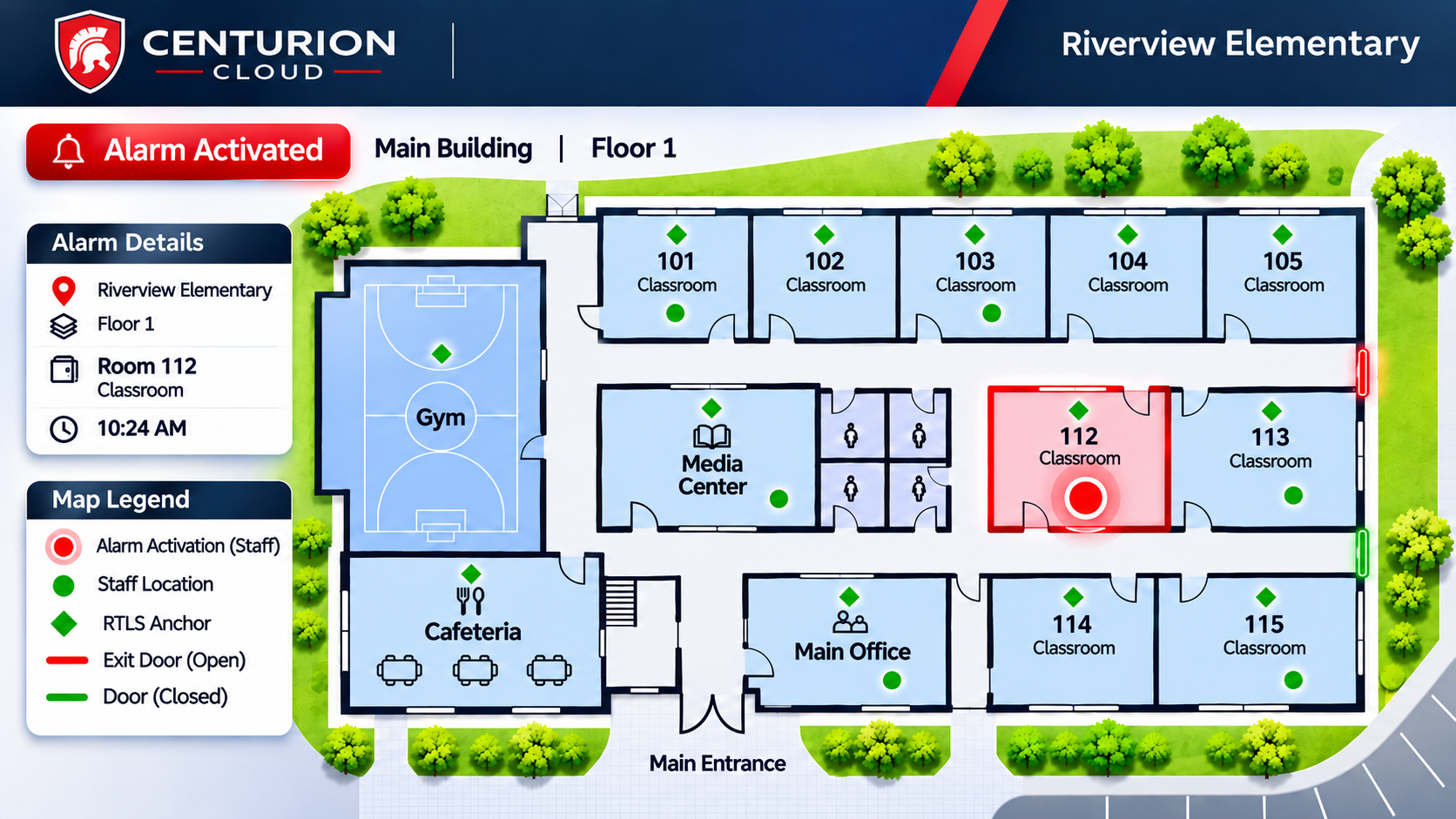
When a nurse, teacher, or court clerk presses a panic button, the people coming to help need to know where that person is. A street address will get responders to the right building. In a hospital tower, a school with several wings, or a courthouse with secure corridors, the address only tells them where to start looking.
Room-level indoor location tracking closes that gap. Centurion Anywhere RTLS connects each alert to a room and floor on your facility floor plan, so the security and medical teams inside your building can go straight to the person who needs them.
Key Takeaways
- A street address gets responders to the building. Room-level location tells them which room and floor.
- Centurion Anywhere RTLS uses Bluetooth anchors to show an alert's room and floor on your facility floor plan in Centurion Cloud.
- GPS protects staff in the field. Inside a building, RTLS adds the room and floor in covered areas, and Unified switches between the two on one badge.
- Indoor location tracking is most useful for internal and medical responders. Police follow their own protocols and go to the threat in a severe event.
- Room-level coverage applies only where anchors are installed and validated.
The Difference Between an Address and a Location
An address tells you which building to drive to. "1200 Example Ave" is enough to get a car to the curb, and it says nothing about which room the alert came from. "Room 214, Floor 2" tells a responder which stairwell to take and which door to open.
The gap gets wider as buildings get bigger. A person who presses a duress alarm may be moving away from a threat or standing in a part of the building they rarely visit. Under stress, they may also struggle to explain where they are, so the alert has to carry that information for them. Without room-level data, the team responding has to rely on a phone call, a radio check, or a floor-by-floor search to find them.
What Happens Between Reaching the Building and Reaching the Person
Inside most facilities, the first people to respond are already in the building. Depending on the setting, that could be hospital security, a charge nurse, a school's front office team, court security staff, or a plant's medical responders. These teams know the building, and a room and floor on the alert lets them move to the right place as soon as it comes in. Any time saved on searching goes to helping the person.
Police follow their own response protocols. In a severe event such as gunfire, officers go to the threat. Room-level location is most valuable to the internal responders and medical teams who need to reach one specific person, while a 911 alert through RapidSOS, where your deployment is configured for it, gets police to the building.
How Indoor Location Tracking Works With Centurion Anywhere RTLS
Centurion Anywhere RTLS is a real-time location system (RTLS) built for panic alerts. Bluetooth anchors are installed on site in the areas of your facility you choose to cover, and who handles the installation depends on the deployment. When a wearer presses their badge, the anchors place the alert in a room and floor, and that location appears on your facility floor plan in Centurion Cloud.
Who Gets Notified When a Duress Alarm Is Triggered
Notification paths are set with each customer during deployment. A school might send one button to its internal team by text and email and route a second button to police through RapidSOS. A hospital might send every alert to its security team. Response Technologies confirms who is notified for each button and scenario before your system goes live.
For K-12 districts, a button that routes to police through RapidSOS supports Alyssa's Law, which calls for silent panic alarms that directly notify law enforcement. Thirteen states have enacted the law as of November 2026, and requirements vary by state.
Location Updates as the Wearer Moves
A person in danger does not always stay in one place. RTLS keeps updating the location as the wearer moves, and the floor plan in Centurion Cloud changes with them. In one incident playback, the location marker follows a staff member from the lobby to Floor 2 and then down to the basement, with the map switching floors at each step.
Every activation is also logged. Centurion Cloud keeps a timestamped record of each action taken on an incident, and supervisors can replay it step by step for after-action review.
Coverage Depends on Where Anchors Are Installed
Room-level location is available only in areas where anchors are installed and validated. If a wing, floor, or outbuilding has no anchors, RTLS cannot place an alert in a room there. For that reason, coverage planning comes first in every deployment, and location and alerts are tested on site before your team is trained.
Why GPS Does Not Give Reliable Floor-Level Location Indoors
GPS works by receiving signals from satellites, and GPS.gov lists sky blockage among the factors that affect the accuracy a receiver attains. Inside a building, the roof and the floors above block that view of the sky. A position on a map also leaves out the floor, a gap the FCC addressed for wireless 911 calls with a separate vertical location requirement because responders could otherwise "search in vain the wrong floors of a building" (Federal Register, 2020).
Outdoors, GPS is the right tool. Centurion Anywhere GPS, our gps panic button, uses GPS and cellular location to protect staff who work in the field, including home health clinicians, lone workers, and judges traveling off-site. It needs no anchors or on-site hardware, and where supported and configured, a press and hold routes the alert to 911 through RapidSOS with the wearer's live location.
GPS, RTLS and Unified Compared
| Centurion Anywhere GPS | Centurion Anywhere RTLS | Centurion Anywhere Unified | |
|---|---|---|---|
| Where it works | Outdoors and in the field | Covered areas inside your facility | Indoors and outdoors |
| How it locates | GPS and cellular | Bluetooth anchors | Switches automatically to the best available location |
| What responders see | Live location in Centurion Cloud | Room and floor on your facility floor plan | Room and floor indoors, GPS location outdoors |
| On-site hardware | None | Anchors in covered areas | Anchors in covered areas |
| Typical wearers | Home health staff, lone workers, judges off-site | Hospital and school staff | Staff who move between buildings, parking lots, and the field |
How Unified Combines GPS and RTLS on One Badge
Many staff do not stay in one environment. A home health nurse might start the day at a clinic before driving to patient homes, and a plant supervisor might walk between production buildings and the yard. Centurion Anywhere Unified puts outdoor GPS and indoor anchors on one Anywhere Badge and switches to the best available location automatically, so the wearer never changes modes. Organizations can also start with RTLS and add outdoor coverage later on the same platform.
Administrators manage Unified from one place in Centurion Cloud, with one fleet of badges, one set of users, and one incident history. For an employee panic button program across several sites, the security team can review every incident in the same system, whether it started in a hallway or a parking lot.
**See how room and floor appear in Centurion Cloud and how notification paths are set for each button. **Explore Centurion Anywhere RTLS
Which Areas of a Facility to Cover First
Start with the places where staff are most likely to need help and hardest to find. Good candidates include areas where people work alone, spaces where confrontations with patients or the public are more likely, and parts of the building far from where your responders are stationed. Starting points vary by facility type:
- Hospitals can look to OSHA's Guidelines for Preventing Workplace Violence for Healthcare and Social Service Workers, which name inpatient and acute psychiatric services and high-volume urban emergency departments among the highest-risk settings and list working alone in a facility as a risk factor.
- Schools could start with the nurse's office or an isolated wing.
- In courthouses and government buildings, courtrooms, judges' chambers, clerks' offices, and public service counters are likely first areas.
- On manufacturing sites, the plant floor and warehouse areas where night-shift staff work alone are reasonable places to begin.
Your own incident history is a useful guide. Look at where past alerts, calls for help, and workplace violence reports have come from, and use that record to rank floors and wings. If you cannot cover the whole building at once, ask our team about planning coverage in phases.
The Four Steps to Deploying Room-Level Location
Every facility is different, so final steps are agreed with each customer. Deployments follow four stages:
- Define the rooms, floors, and responder groups you want covered.
- Review your floor plans with our team and plan anchor coverage for those areas.
- Confirm who is notified for each button and each scenario.
- Validate location and alerts on site, then train your team.
Frequently Asked Questions
What is indoor location tracking for a panic button?
Indoor location tracking uses an indoor positioning system, such as Bluetooth anchors, to identify where a person is inside a building. For a panic button, the alert arrives with a room and floor along with the street address. Centurion Anywhere RTLS uses this method in the covered areas of your facility.
Why doesn't GPS give reliable floor-level location indoors?
GPS accuracy depends on a clear view of the sky, which a building's roof and upper floors block. A GPS position can confirm someone is at a building, and an indoor positioning system such as Bluetooth anchors places them in a specific room and floor in the areas you cover.
Which areas of a facility should be covered first?
Most teams start with areas where staff work alone, where confrontations are more likely, and where a responder would take longest to find someone. Past incident reports help rank those areas.
What does the alert show if the wearer is outside a covered area?
If the badge picks up an anchor when it activates, the alert appears as a location marker on your facility floor plan. If it does not detect an anchor and your organization has a Centurion Anywhere Unified subscription, the badge uses the wearer's phone to send a GPS location, which appears on a map.
Can existing Centurion Anywhere GPS customers add indoor location?
Yes. Current Response Technologies customers, including Centurion Anywhere GPS users, can request an upgrade assessment to add room-and-floor location. Badge models are confirmed during deployment.
Plan Indoor Location Tracking for Your Facility
Our team can walk through your floor plans with you, help decide which areas to cover first, and show how an alert appears in Centurion Cloud. Book a consultation to start planning your deployment.